simple-coding-agentv0.9.0
Autonomous agent for software engineers & dev teams

Hire an agent that resolves your GitHub Issues autonomously.

Just apply the ready-for-agent label. Agent Sid picks up the task, spins up an isolated Docker sandbox, runs test suites, writes the code, and delivers a verified Pull Request.

Docker templates included Bring your own LLM

BETA READYAgent Dashboard is now available for testing with Docker Compose.

See Dashboard
LAB DISPATCHActive Development:

New graph-driven autonomous coding agent 'Rex'.

Roadmap
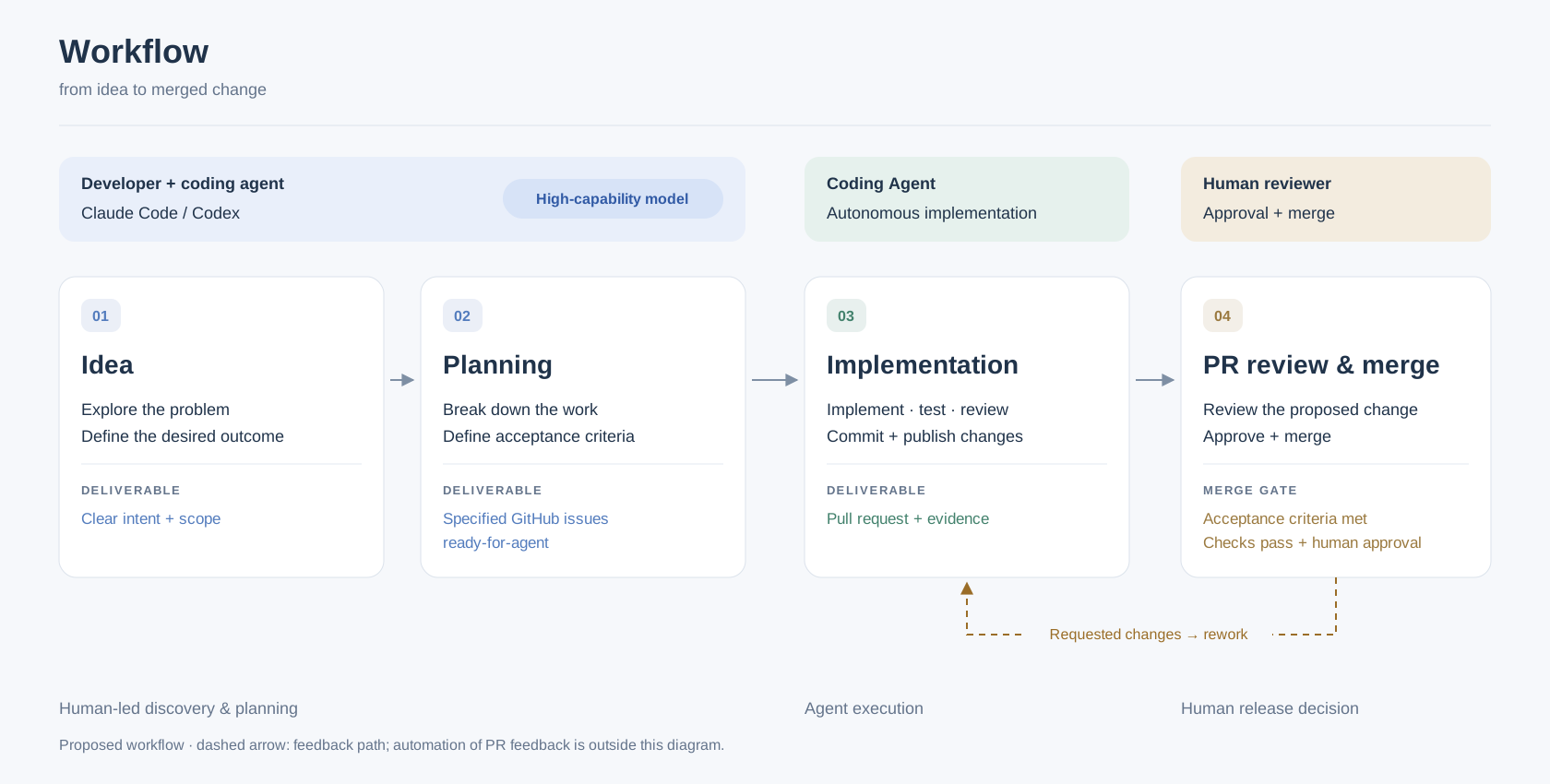
Delivery Workflow
Workflow — from idea to merged change
Dashed line: feedback path (Requested changes → rework).

Quick start

From zero to a running, controllable agent instance — or a multi-Worker Pool — in six steps with agent-forge .

  1. Get ready

    You need:

    • Docker with Compose v2.17+
    • A coding assistant (e.g. Claude Code)
    • A GitHub token with read/write access to the target repo's contents, issues and pull requests
    • Model API credentials
    git clone https://github.com/lbacik/agent-forge.git
    cd agent-forge
  2. Create an agent (or Pool) with create-agent

    Ask your coding assistant to use the create-agent skill from agent-forge. It inspects the repository's stack and CI and generates the instance: Dockerfile, compose file, profile and .env.

    An instance runs 1 Worker by default; ask create-agent for N Workers to generate a Pool taking issues from the same Queue.

    Use create-agent to create an agent for https://github.com/owner/repository in agent-instances/agent-repository/ (with 2 Workers).

    With Claude Code:

    cd agent-forge
    claude "/create-agent https://<github-project-url>"
  3. Build and run with Docker Compose

    Run every command from the instance directory.

    The agent_data volume (plus data_2..N for additional Workers) keeps the repository checkout, state and attempt logs across restarts and rebuilds. Only down -v deletes them.

    cd agent-instances/agent-repository

    Every Compose command runs from the instance directory.

    docker compose config -q

    Validate the generated configuration.

    docker compose build

    Build the shared image once (via the primary agent service). Rebuild after profile or Dockerfile changes.

    docker compose up -d

    Start the instance (or all Workers in the Pool). Run again after a rebuild to apply the new image.

    docker compose ps

    Check that all Worker containers are running.

    docker compose logs --tail=100 -f

    Follow the startup logs (pass a service name for one Worker).

    docker compose down

    Stop all Workers. Named volumes (agent_data, data_2..N) are kept.

    docker compose down -v

    Deletes agent_data and data_2..N for every Worker: repository checkouts, state and attempt logs.

  4. Scale the Worker Pool with manage-pool

    Pool Scaling

    Add, remove, stop or resume Workers with manage-pool. Each Worker has its own volume and WORKER_ID (<short-name>-<n>), so scaling edits compose.yaml rather than using docker compose --scale.

    INSTANCE POOL TOPOLOGYclaimed-by:<worker-id>
    agent
    agent_data
    id: repo-1
    agent-2
    data_2
    id: repo-2
    agent-N
    data_N
    + scale
    Use manage-pool to add a Worker to agent-instances/agent-repository.
    claude "/manage-pool add a worker to agent-repository"

    Add agent-<n> with its own data_<n> volume and WORKER_ID, then start only the new container.

    claude "/manage-pool remove worker 2 from agent-repository"

    Drain agent-2, verify it holds no active claimed-by:* Claim, then stop and remove it.

    claude "/manage-pool stop agent-repository"

    Drain active attempts and stop issue intake across the whole Pool (or a single named Worker).

    claude "/manage-pool resume agent-repository"

    Bring stopped Worker containers back up and resume issue intake.

  5. Control Workers with agentctl

    agentctl runs inside the live Worker container (agent or agent-2..N). Start with status: its first line names TARGET_REPO, so check it before any command that changes what the Worker does.

    You can also perform these actions (stop, resume, handoff now, next issue) from the browser via the Agent Dashboard ↓ control console.

    • Always use the absolute path /usr/local/bin/agentctl. A bare agentctl may resolve to the target repository's package.
    • Never use docker compose run to issue commands. Only the live Worker in its own container accepts them.
    prefix: docker compose exec --user agent <service> /usr/local/bin/agentctl
    status

    Read-only. The first line names TARGET_REPO.

    stop

    Stop picking up new issues (drains the Worker cleanly).

    resume

    Resume issue intake.

    handoff now

    Ask the active attempt to hand off to you.

    next issue <issue-number>

    Make this issue the next one this Worker claims. Pass the issue number (e.g. 42), not the URL.

    command <id>

    Look up a submitted request by its ID.

    Example:

    docker compose exec --user agent agent /usr/local/bin/agentctl status
    docker compose exec --user agent agent-2 /usr/local/bin/agentctl next issue 42
  6. Debug with debug-agent

    Ask your coding assistant to use the debug-agent skill. It reads startup logs, persisted state, attempt events and validation output across any Worker in the Pool (--worker 2 or pool-status.sh).

    Use debug-agent to investigate agent-instances/agent-repository. Check the latest run for issue #42.

    With Claude Code:

    claude "/debug-agent <github-project-issue> [context:docker-context]"
NEW IN BETA • AGENT DASHBOARD

Observe & command your agent fleet

lbacik/agent-dashboard
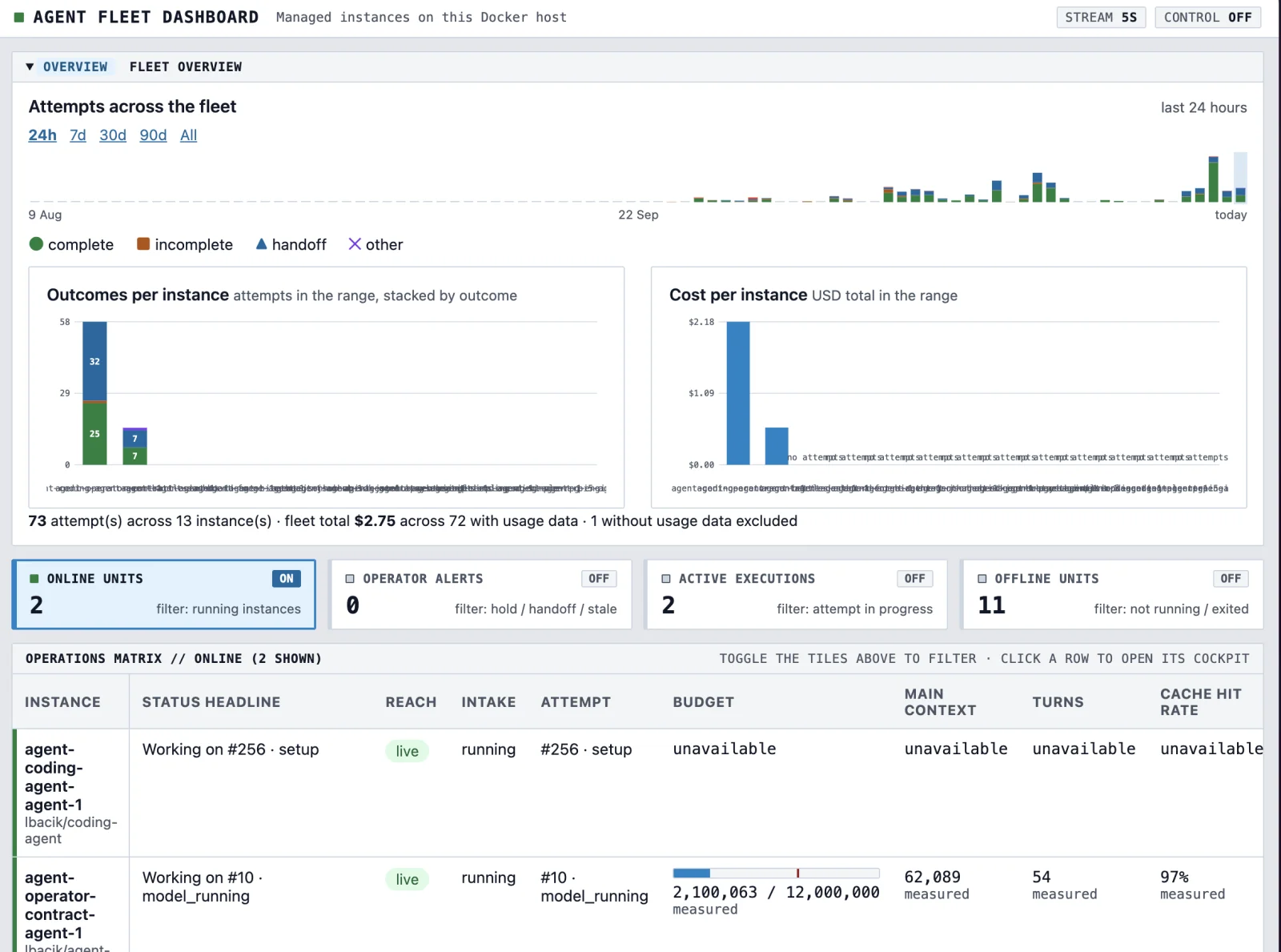
01 // FLEET OVERVIEWFleet Overview & Cost Analytics
Fleet Overview & Cost Analytics
Collapsible /overview panel charting attempt outcomes (complete, incomplete, handoff, other) and USD cost per instance across 24h / 7d / 30d / 90d / All presets plus a 90-day activity strip.
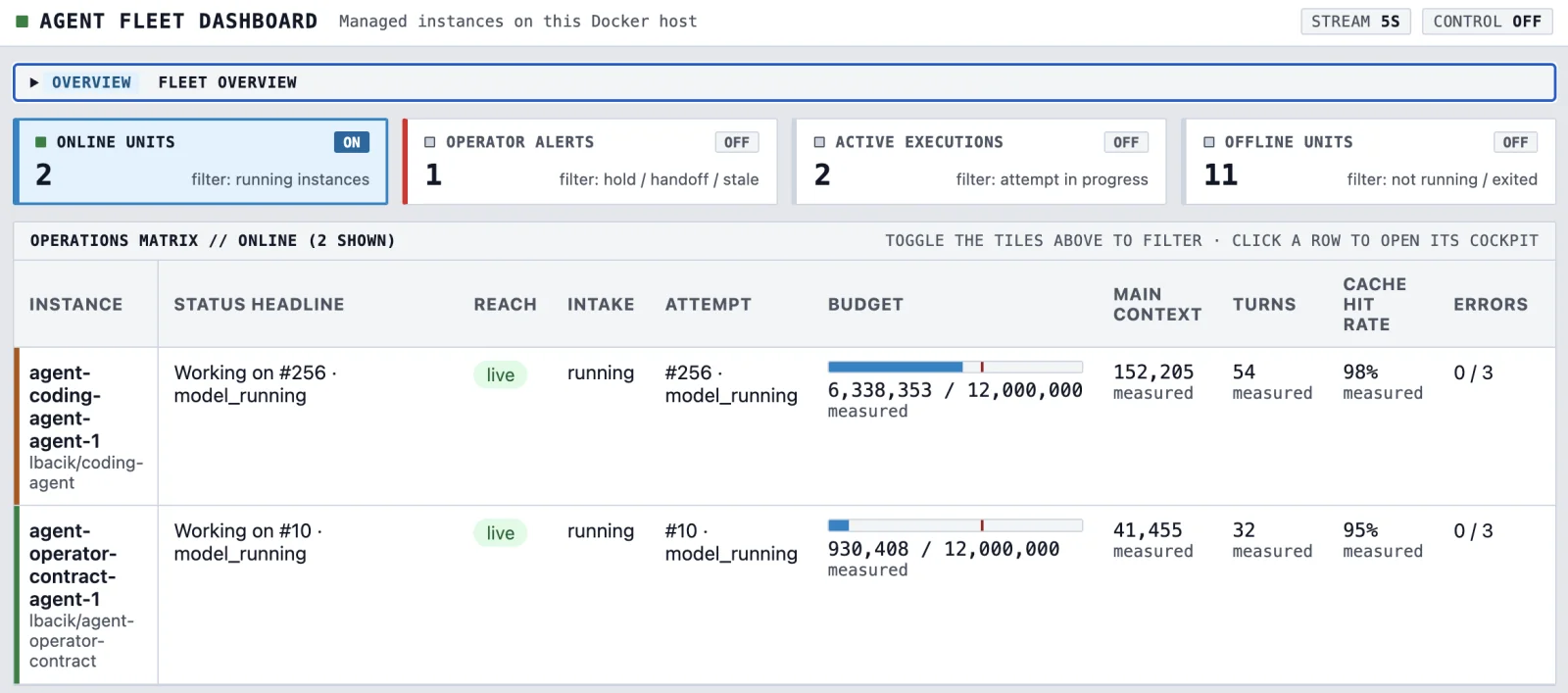
02 // OPERATIONS MATRIXReal-Time Operations Matrix
Real-Time Operations Matrix
Automatic container discovery by image label with live telemetry polling via docker exec <container> agentctl telemetry --json. Filter instant tiles for Online Units, Operator Alerts, Active Executions, and Offline Units.
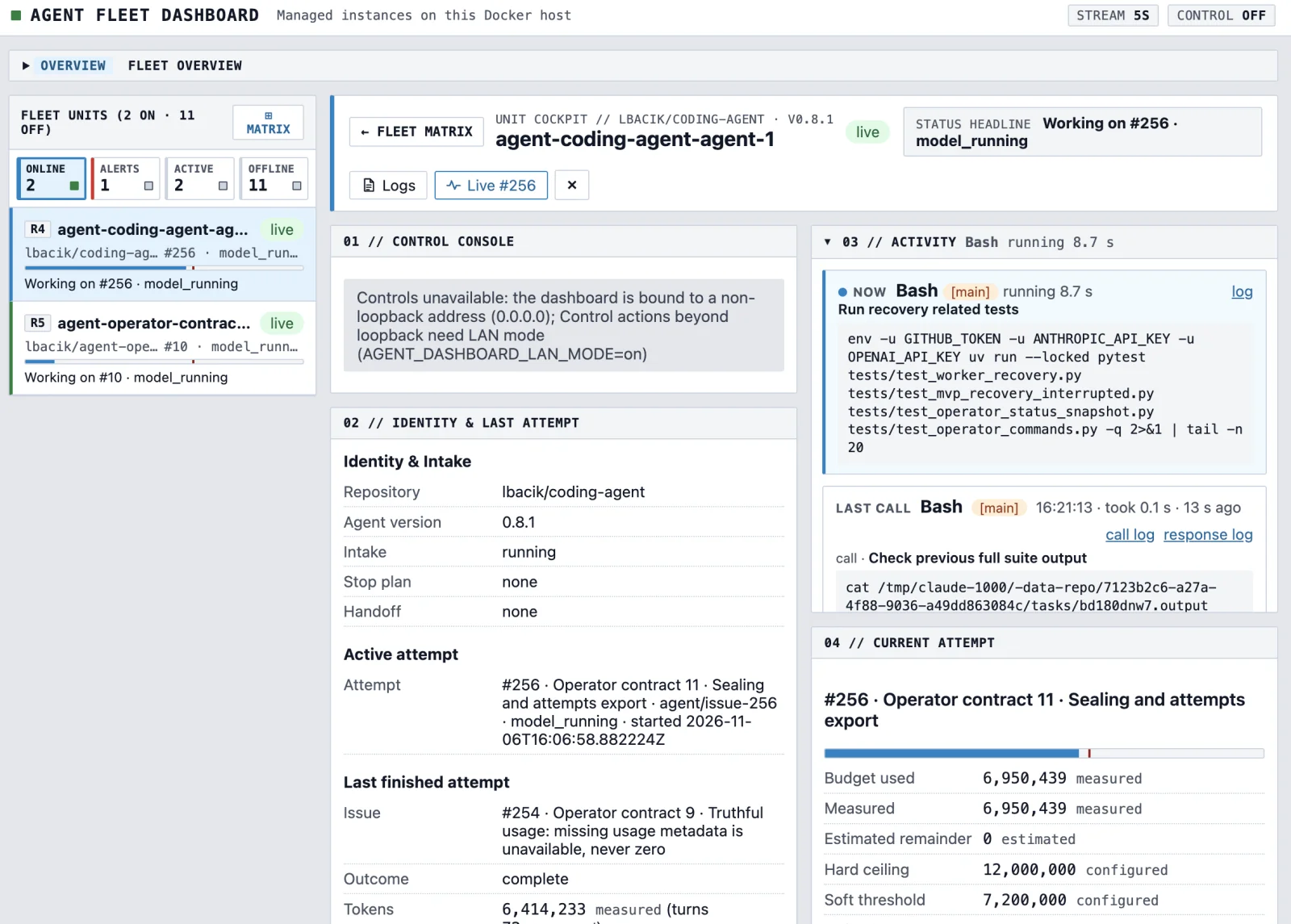
03 // UNIT COCKPITUnit Cockpit & 2-Step Control Console
Unit Cockpit & 2-Step Control Console
Per-instance drill-down pairing the 2-step Control Console (stop, stop --after N, resume, handoff now, next issue <n>) with live tool execution activity, intake status, and current/last attempt telemetry.
04 // ATTEMPT PROGRESSAttempt Progress & Offline Evidence Log
Attempt Progress & Offline Evidence Log
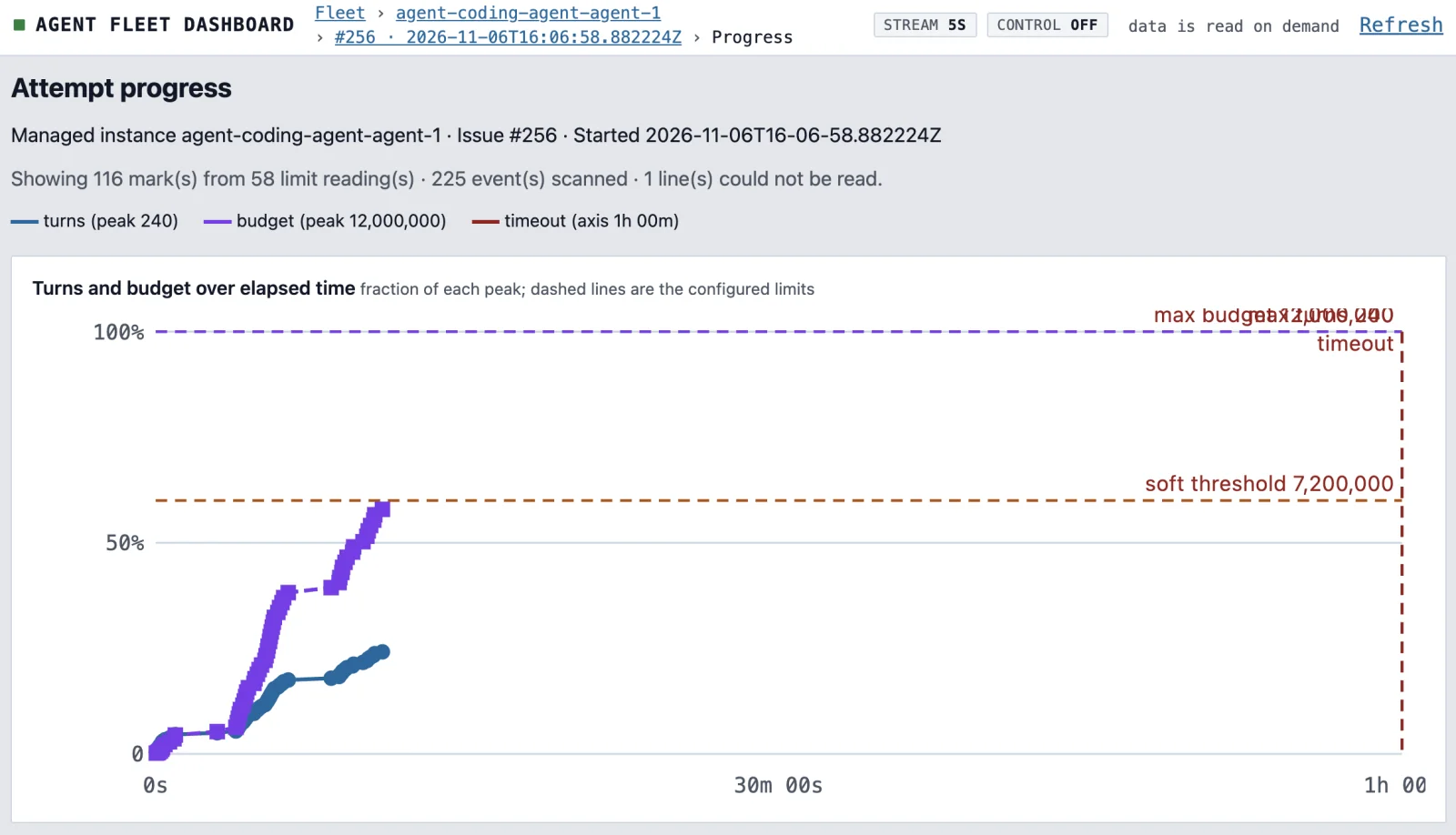
Plots turns and token budget over elapsed time against the configured soft threshold, hard ceiling, and timeout — above a server-paged event stream with inline Evidence file previews and downloads.

Run in Docker Compose in 3 steps

Deploys as the fixed Compose project fleet-dashboard from lbacik/agent-dashboard so it never collides with co-located agent containers.

  1. Find your Docker socket GID

    The container mounts /var/run/docker.sock and runs as a non-root user. DOCKER_GID in .env must match the group ID owning the socket on the daemon host.

    When deploying through a remote Docker context (e.g. from a laptop to a Raspberry Pi), read the GID through that same context.

    docker run --rm -v /var/run/docker.sock:/var/run/docker.sock \
      alpine stat -c %g /var/run/docker.sock
  2. Build and start fleet-dashboard

    Copy .env.example to .env and set DOCKER_GID, DASHBOARD_BIND (defaults to 127.0.0.1), and AGENT_DASHBOARD_ALLOWED_HOSTS.

    No shared Docker network or exposed agent ports are needed: the dashboard reaches agents through the mounted host socket.

    git clone https://github.com/lbacik/agent-dashboard.git
    cd agent-dashboard
    cp .env.example .env   # edit: DOCKER_GID, DASHBOARD_BIND, AGENT_DASHBOARD_ALLOWED_HOSTS
    docker compose build
    docker compose up -d
  3. Optional: Enable LAN mode & Operator accounts

    With docker-compose.yml alone, the container provides a read-only view. To unlock 2-step Control actions over the network, enable the docker-compose.lan.yml overlay (requires Docker Compose 2.24+) behind a TLS reverse proxy and create a controller Operator account.

    COMPOSE_FILE=docker-compose.yml:docker-compose.lan.yml
    PROXY_NETWORK=proxy
    VIRTUAL_HOST=dashboard.example.lan
    AGENT_DASHBOARD_ALLOWED_HOSTS=dashboard.example.lan
    AGENT_DASHBOARD_TRUSTED_PROXIES=172.18.0.0/16
    docker compose up -d
    docker compose logs dashboard
    docker compose exec dashboard agent-dashboard account add alice \
      --role controller --url https://dashboard.example.lan

Coming Soon • Active Development

coding-agentIn Active Dev

Coding Agent 'Rex'

A new type of containerised autonomous Worker (lbacik/coding-agent) that claims issues from a Target Repository, executes a graph-driven workflow, and delivers a verified Pull Request.

  • Built on LangGraph for stateful, graph-based agent execution.
  • Agent workflow configurable via a YAML file.
  • Full Attempt graph with Run Ledger persistence and redacted model transcripts.

Newsletter

Sign up to receive updates on agent releases, benchmarks, and early access.

Running human check… • Zero spam • No tracking

Change log

What changed in each simple-coding-agent Release.

  • v0.9.09 Nov 2026
    OtherOperator contract 1 · Prove Offline Read of the control store under WAL#350
  • OtherOperator contract 2 · Prefactor: consolidate the lifecycle fakes into the shared test fakes#351
  • OtherOperator contract 3 · agentctl --contract 1: grammar, envelope, exit codes and identity#352
  • OtherOperator contract 13 · Docs: ADR superseding ADR 0006's serving rationale, glossary moves and doc fixes#353
  • OtherOperator contract 4 · Status Snapshot from a running instance#354
  • OtherOperator contract 8 · Attempt Archives: attempts list and attempts show#355
  • OtherOperator contract 5 · Core mutations: stop, resume and command#356
  • OtherOperator contract 12 · Contract discovery labels and removal of the legacy role label#357
  • OtherOperator contract 6 · Remaining mutations: stop --after, next issue, handoff now, recovery and errors reset#358
  • OtherOperator contract 7 · Volume lock, early serving, starting/recovering and Halt#359
  • OtherOperator contract 9 · Contract Events: recent_events and events.jsonl#360
  • OtherOperator contract 10 · Sealed Attempt Archives and attempts export#361
All Releases on GitHub
Active in Production Today

Projects simple-coding-agent is already working on today!

Real-world repositories, production applications, and developer tools where our autonomous agent actively resolves issues, runs isolated Docker verification suites, and delivers verified Pull Requests.

Core Agent Engine

simple-coding-agent

Unattended autonomous coding agent that picks up GitHub issues, executes code in isolated Docker sandboxes, and delivers verified PRs.

PythonDockerGitHub API
ready-for-agentGitHub
Agent Tooling

agent-installer

Local CLI for installing agent artifacts, system rules, and developer commands directly into Codex and Claude Code environments.

npm registry:agent-installer
TypeScriptNode.jsCLInpm
ready-for-agentGitHub
Web Application

jsonhub-web-ui

Interactive web application and UI for exploring, visualizing, and managing schema-validated JsonHub entities and definitions.

Live app:jsonhub.cloud
Next.jsReactTypeScript
ready-for-agentGitHub
Developer CLI

jsonhub-cli

Command-line client for JsonHub — store JSON documents, validate against schemas, and automate data workflows from the terminal.

PythonCLIJSON Schema
ready-for-agentGitHub
Code Generation

jsonhub-sdk-generator

Automated SDK generator transforming OpenAPI specifications into typed client libraries ready for application consumption.

JavaScriptOpenAPISDK Generator
ready-for-agentGitHub
Web Application

paysubscriptions

Web application for tracking recurring personal and household subscription expenses, monthly/yearly spending totals, and renewal reminders.

PHP 8.4Symfony 7.4MySQLFrankenPHP
ready-for-agentGitHub

Every repository uses isolated Docker sandboxes and verified automated test gates before PR merges.